

Not updated for CUSTOM MODULES yet
Hi guys, thanks for stopping by. I haven't updated this post yet to accommodate front-end accessibility. I'm working on it and hope ti have it updated soon.
Sincerely,
Rebekah
Divi and the Blurb
Again with the Blurb? I know, I know. I am a little obsessed. This time we're making it flip. Right now card style layouts are all the rage. This is tutorial will incorporate another wonderful tutorial from Tymapnus. There are many styles to chose from but, I am using #7 with some modifications. I want mine to turn to the right instead of turn down. Example below:
Necessary Notes!
As always, this tutorial is meant to be used in a CHILD THEME! Otherwise, you'll lose all of the awesome when you update your theme. Another important note: Divi changed a little structure in 3.0. This tutorial is for Divi 3.0 or later. It won't work correctly pre 3.0.
The Code
Of course, you can find the files on github. The first thing we are going to do is create a new file for our custom modules folder. The file is going to be creatively called, card_blurb.php. In this file we are going to add our custom module data. The real changes happen around line 401 with the changing of the output.
< ?php
class FDL_Builder_Module_Card_Blurb extends ET_Builder_Module {
function init() {
$this->name = esc_html__( 'Card Blurb', 'et_builder' );
$this->slug = 'et_pb_blurb4';
$this->fb_support = true;
$this->main_css_element = '%%order_class%%.et_pb_blurb';
$this->whitelisted_fields = array(
'title',
'url',
'url_new_window',
'use_icon',
'font_icon',
'icon_color',
'use_circle',
'circle_color',
'use_circle_border',
'circle_border_color',
'image',
'alt',
'icon_placement',
'animation',
'background_layout',
'text_orientation',
'content_new',
'admin_label',
'module_id',
'module_class',
'max_width',
'use_icon_font_size',
'icon_font_size',
'max_width_tablet',
'max_width_phone',
'icon_font_size_tablet',
'icon_font_size_phone',
);
$et_accent_color = et_builder_accent_color();
$this->fields_defaults = array(
'url_new_window' => array( 'off' ),
'use_icon' => array( 'off' ),
'icon_color' => array( $et_accent_color, 'add_default_setting' ),
'use_circle' => array( 'off' ),
'circle_color' => array( $et_accent_color, 'only_default_setting' ),
'use_circle_border' => array( 'off' ),
'circle_border_color' => array( $et_accent_color, 'only_default_setting' ),
'icon_placement' => array( 'top' ),
'animation' => array( 'top' ),
'background_layout' => array( 'light' ),
'text_orientation' => array( 'center' ),
'use_icon_font_size' => array( 'off' ),
);
$this->advanced_options = array(
'fonts' => array(
'header' => array(
'label' => esc_html__( 'Header', 'et_builder' ),
'css' => array(
'main' => "{$this->main_css_element} h4, {$this->main_css_element} h4 a",
),
),
'body' => array(
'label' => esc_html__( 'Body', 'et_builder' ),
'css' => array(
'line_height' => "{$this->main_css_element} p",
),
),
),
'background' => array(
'settings' => array(
'color' => 'alpha',
),
),
'border' => array(),
'custom_margin_padding' => array(
'css' => array(
'important' => 'all',
),
),
);
$this->custom_css_options = array(
'blurb_image' => array(
'label' => esc_html__( 'Blurb Image', 'et_builder' ),
'selector' => '.et_pb_main_blurb_image',
),
'blurb_title' => array(
'label' => esc_html__( 'Blurb Title', 'et_builder' ),
'selector' => 'h4',
),
'blurb_content' => array(
'label' => esc_html__( 'Blurb Content', 'et_builder' ),
'selector' => '.et_pb_blurb_content',
),
);
}
function get_fields() {
$et_accent_color = et_builder_accent_color();
$image_icon_placement = array(
'top' => __( 'Top', 'et_builder' ),
);
if ( ! is_rtl() ) {
$image_icon_placement['left'] = esc_html__( 'Left', 'et_builder' );
} else {
$image_icon_placement['right'] = esc_html__( 'Right', 'et_builder' );
}
$fields = array(
'title' => array(
'label' => esc_html__( 'Title', 'et_builder' ),
'type' => 'text',
'option_category' => 'basic_option',
'description' => esc_html__( 'The title of your blurb will appear in bold below your blurb image.', 'et_builder' ),
),
'url' => array(
'label' => esc_html__( 'Url', 'et_builder' ),
'type' => 'text',
'option_category' => 'basic_option',
'description' => esc_html__( 'If you would like to make your blurb a link, input your destination URL here.', 'et_builder' ),
),
'url_new_window' => array(
'label' => esc_html__( 'Url Opens', 'et_builder' ),
'type' => 'select',
'option_category' => 'configuration',
'options' => array(
'off' => esc_html__( 'In The Same Window', 'et_builder' ),
'on' => esc_html__( 'In The New Tab', 'et_builder' ),
),
'description' => esc_html__( 'Here you can choose whether or not your link opens in a new window', 'et_builder' ),
),
'use_icon' => array(
'label' => esc_html__( 'Use Icon', 'et_builder' ),
'type' => 'yes_no_button',
'option_category' => 'basic_option',
'options' => array(
'off' => esc_html__( 'No', 'et_builder' ),
'on' => esc_html__( 'Yes', 'et_builder' ),
),
'affects' => array(
'font_icon',
'use_circle',
'icon_color',
'image',
'alt',
),
'description' => esc_html__( 'Here you can choose whether icon set below should be used.', 'et_builder' ),
),
'font_icon' => array(
'label' => esc_html__( 'Icon', 'et_builder' ),
'type' => 'text',
'option_category' => 'basic_option',
'class' => array( 'et-pb-font-icon' ),
'renderer' => 'et_pb_get_font_icon_list',
'renderer_with_field' => true,
'description' => esc_html__( 'Choose an icon to display with your blurb.', 'et_builder' ),
'depends_default' => true,
),
'icon_color' => array(
'label' => esc_html__( 'Icon Color', 'et_builder' ),
'type' => 'color-alpha',
'description' => esc_html__( 'Here you can define a custom color for your icon.', 'et_builder' ),
'depends_default' => true,
),
'use_circle' => array(
'label' => esc_html__( 'Circle Icon', 'et_builder' ),
'type' => 'yes_no_button',
'option_category' => 'configuration',
'options' => array(
'off' => esc_html__( 'No', 'et_builder' ),
'on' => esc_html__( 'Yes', 'et_builder' ),
),
'affects' => array(
'use_circle_border',
'circle_color',
),
'description' => esc_html__( 'Here you can choose whether icon set above should display within a circle.', 'et_builder' ),
'depends_default' => true,
),
'circle_color' => array(
'label' => esc_html__( 'Circle Color', 'et_builder' ),
'type' => 'color',
'description' => esc_html__( 'Here you can define a custom color for the icon circle.', 'et_builder' ),
'depends_default' => true,
),
'use_circle_border' => array(
'label' => esc_html__( 'Show Circle Border', 'et_builder' ),
'type' => 'yes_no_button',
'option_category' => 'layout',
'options' => array(
'off' => esc_html__( 'No', 'et_builder' ),
'on' => esc_html__( 'Yes', 'et_builder' ),
),
'affects' => array(
'circle_border_color',
),
'description' => esc_html__( 'Here you can choose whether if the icon circle border should display.', 'et_builder' ),
'depends_default' => true,
),
'circle_border_color' => array(
'label' => esc_html__( 'Circle Border Color', 'et_builder' ),
'type' => 'color',
'description' => esc_html__( 'Here you can define a custom color for the icon circle border.', 'et_builder' ),
'depends_default' => true,
),
'image' => array(
'label' => esc_html__( 'Image', 'et_builder' ),
'type' => 'upload',
'option_category' => 'basic_option',
'upload_button_text' => esc_attr__( 'Upload an image', 'et_builder' ),
'choose_text' => esc_attr__( 'Choose an Image', 'et_builder' ),
'update_text' => esc_attr__( 'Set As Image', 'et_builder' ),
'depends_show_if' => 'off',
'description' => esc_html__( 'Upload an image to display at the top of your blurb.', 'et_builder' ),
),
'alt' => array(
'label' => esc_html__( 'Image Alt Text', 'et_builder' ),
'type' => 'text',
'option_category' => 'basic_option',
'description' => esc_html__( 'Define the HTML ALT text for your image here.', 'et_builder' ),
'depends_show_if' => 'off',
),
'icon_placement' => array(
'label' => esc_html__( 'Image/Icon Placement', 'et_builder' ),
'type' => 'select',
'option_category' => 'layout',
'options' => $image_icon_placement,
'description' => esc_html__( 'Here you can choose where to place the icon.', 'et_builder' ),
),
'animation' => array(
'label' => esc_html__( 'Image/Icon Animation', 'et_builder' ),
'type' => 'select',
'option_category' => 'configuration',
'options' => array(
'top' => esc_html__( 'Top To Bottom', 'et_builder' ),
'left' => esc_html__( 'Left To Right', 'et_builder' ),
'right' => esc_html__( 'Right To Left', 'et_builder' ),
'bottom' => esc_html__( 'Bottom To Top', 'et_builder' ),
'off' => esc_html__( 'No Animation', 'et_builder' ),
),
'description' => esc_html__( 'This controls the direction of the lazy-loading animation.', 'et_builder' ),
),
'background_layout' => array(
'label' => esc_html__( 'Text Color', 'et_builder' ),
'type' => 'select',
'option_category' => 'color_option',
'options' => array(
'light' => esc_html__( 'Dark', 'et_builder' ),
'dark' => esc_html__( 'Light', 'et_builder' ),
),
'description' => esc_html__( 'Here you can choose whether your text should be light or dark. If you are working with a dark background, then your text should be light. If your background is light, then your text should be set to dark.', 'et_builder' ),
),
'text_orientation' => array(
'label' => esc_html__( 'Text Orientation', 'et_builder' ),
'type' => 'select',
'option_category' => 'layout',
'options' => et_builder_get_text_orientation_options(),
'description' => esc_html__( 'This will control how your blurb text is aligned.', 'et_builder' ),
),
'content_new' => array(
'label' => esc_html__( 'Content', 'et_builder' ),
'type' => 'tiny_mce',
'option_category' => 'basic_option',
'description' => esc_html__( 'Input the main text content for your module here.', 'et_builder' ),
),
'max_width' => array(
'label' => esc_html__( 'Image Max Width', 'et_builder' ),
'type' => 'text',
'option_category' => 'layout',
'tab_slug' => 'advanced',
'mobile_options' => true,
'validate_unit' => true,
),
'use_icon_font_size' => array(
'label' => esc_html__( 'Use Icon Font Size', 'et_builder' ),
'type' => 'yes_no_button',
'option_category' => 'font_option',
'options' => array(
'off' => esc_html__( 'No', 'et_builder' ),
'on' => esc_html__( 'Yes', 'et_builder' ),
),
'affects' => array(
'icon_font_size',
),
'tab_slug' => 'advanced',
),
'icon_font_size' => array(
'label' => esc_html__( 'Icon Font Size', 'et_builder' ),
'type' => 'range',
'option_category' => 'font_option',
'tab_slug' => 'advanced',
'default' => '96px',
'range_settings' => array(
'min' => '1',
'max' => '120',
'step' => '1',
),
'mobile_options' => true,
'depends_default' => true,
),
'max_width_tablet' => array (
'type' => 'skip',
'tab_slug' => 'advanced',
),
'max_width_phone' => array (
'type' => 'skip',
'tab_slug' => 'advanced',
),
'icon_font_size_tablet' => array(
'type' => 'skip',
'tab_slug' => 'advanced',
),
'icon_font_size_phone' => array(
'type' => 'skip',
'tab_slug' => 'advanced',
),
'disabled_on' => array(
'label' => esc_html__( 'Disable on', 'et_builder' ),
'type' => 'multiple_checkboxes',
'options' => array(
'phone' => esc_html__( 'Phone', 'et_builder' ),
'tablet' => esc_html__( 'Tablet', 'et_builder' ),
'desktop' => esc_html__( 'Desktop', 'et_builder' ),
),
'additional_att' => 'disable_on',
'option_category' => 'configuration',
'description' => esc_html__( 'This will disable the module on selected devices', 'et_builder' ),
),
'admin_label' => array(
'label' => esc_html__( 'Admin Label', 'et_builder' ),
'type' => 'text',
'description' => esc_html__( 'This will change the label of the module in the builder for easy identification.', 'et_builder' ),
),
'module_id' => array(
'label' => esc_html__( 'CSS ID', 'et_builder' ),
'type' => 'text',
'option_category' => 'configuration',
'tab_slug' => 'custom_css',
'option_class' => 'et_pb_custom_css_regular',
),
'module_class' => array(
'label' => esc_html__( 'CSS Class', 'et_builder' ),
'type' => 'text',
'option_category' => 'configuration',
'tab_slug' => 'custom_css',
'option_class' => 'et_pb_custom_css_regular',
),
);
return $fields;
}
function shortcode_callback( $atts, $content = null, $function_name ) {
$module_id = $this->shortcode_atts['module_id'];
$module_class = $this->shortcode_atts['module_class'];
$title = $this->shortcode_atts['title'];
$url = $this->shortcode_atts['url'];
$image = $this->shortcode_atts['image'];
$url_new_window = $this->shortcode_atts['url_new_window'];
$alt = $this->shortcode_atts['alt'];
$background_layout = $this->shortcode_atts['background_layout'];
$text_orientation = $this->shortcode_atts['text_orientation'];
$animation = $this->shortcode_atts['animation'];
$icon_placement = $this->shortcode_atts['icon_placement'];
$font_icon = $this->shortcode_atts['font_icon'];
$use_icon = $this->shortcode_atts['use_icon'];
$use_circle = $this->shortcode_atts['use_circle'];
$use_circle_border = $this->shortcode_atts['use_circle_border'];
$icon_color = $this->shortcode_atts['icon_color'];
$circle_color = $this->shortcode_atts['circle_color'];
$circle_border_color = $this->shortcode_atts['circle_border_color'];
$max_width = $this->shortcode_atts['max_width'];
$max_width_tablet = $this->shortcode_atts['max_width_tablet'];
$max_width_phone = $this->shortcode_atts['max_width_phone'];
$use_icon_font_size = $this->shortcode_atts['use_icon_font_size'];
$icon_font_size = $this->shortcode_atts['icon_font_size'];
$icon_font_size_tablet = $this->shortcode_atts['icon_font_size_tablet'];
$icon_font_size_phone = $this->shortcode_atts['icon_font_size_phone'];
$module_class = ET_Builder_Element::add_module_order_class( $module_class, $function_name );
if ( 'off' !== $use_icon_font_size ) {
$font_size_values = array(
'desktop' => $icon_font_size,
'tablet' => $icon_font_size_tablet,
'phone' => $icon_font_size_phone,
);
et_pb_generate_responsive_css( $font_size_values, '%%order_class%% .et-pb-icon', 'font-size', $function_name );
}
if ( '' !== $max_width_tablet || '' !== $max_width_phone || '' !== $max_width ) {
$max_width_values = array(
'desktop' => $max_width,
'tablet' => $max_width_tablet,
'phone' => $max_width_phone,
);
et_pb_generate_responsive_css( $max_width_values, '%%order_class%% .et_pb_main_blurb_image img', 'max-width', $function_name );
}
if ( is_rtl() && 'left' === $text_orientation ) {
$text_orientation = 'right';
}
if ( is_rtl() && 'left' === $icon_placement ) {
$icon_placement = 'right';
}
if ( '' !== $title && '' !== $url ) {
$title = sprintf( '%2$s',
esc_url( $url ),
esc_html( $title ),
( 'on' === $url_new_window ? ' target="_blank"' : '' )
);
}
if ( '' !== $title ) {
$title = "{$title}
";
}
if ( '' !== trim( $image ) || '' !== $font_icon ) {
if ( 'off' === $use_icon ) {
$image = sprintf(
' ',
esc_url( $image ),
esc_attr( $alt ),
esc_attr( " et_pb_animation_{$animation}" )
);
} else {
$icon_style = sprintf( 'color: %1$s;', esc_attr( $icon_color ) );
if ( 'on' === $use_circle ) {
$icon_style .= sprintf( ' background-color: %1$s;', esc_attr( $circle_color ) );
if ( 'on' === $use_circle_border ) {
$icon_style .= sprintf( ' border-color: %1$s;', esc_attr( $circle_border_color ) );
}
}
$image = sprintf(
'',
esc_attr( et_pb_process_font_icon( $font_icon ) ),
esc_attr( " et_pb_animation_{$animation}" ),
( 'on' === $use_circle ? ' et-pb-icon-circle' : '' ),
( 'on' === $use_circle && 'on' === $use_circle_border ? ' et-pb-icon-circle-border' : '' ),
$icon_style
);
}
$image = sprintf(
'%1$s',
( '' !== $url
? sprintf(
'%2$s',
esc_url( $url ),
$image,
( 'on' === $url_new_window ? ' target="_blank"' : '' )
)
: $image
)
);
}
$class = " et_pb_module et_pb_bg_layout_{$background_layout} et_pb_text_align_{$text_orientation}";
$output = sprintf(
'
%2$s
%3$s
%1$s
',
$this->shortcode_content,
$image,
$title,
esc_attr( $class ),
( '' !== $module_id ? sprintf( ' id="%1$s"', esc_attr( $module_id ) ) : '' ),
( '' !== $module_class ? sprintf( ' %1$s', esc_attr( $module_class ) ) : '' ),
sprintf( ' et_pb_blurb_position_%1$s', esc_attr( $icon_placement ) ),
esc_url( $url ),
( 'on' === $url_new_window ? ' target="_blank"' : '' )
);
return $output;
}
}
new FDL_Builder_Module_Card_Blurb();
',
esc_url( $image ),
esc_attr( $alt ),
esc_attr( " et_pb_animation_{$animation}" )
);
} else {
$icon_style = sprintf( 'color: %1$s;', esc_attr( $icon_color ) );
if ( 'on' === $use_circle ) {
$icon_style .= sprintf( ' background-color: %1$s;', esc_attr( $circle_color ) );
if ( 'on' === $use_circle_border ) {
$icon_style .= sprintf( ' border-color: %1$s;', esc_attr( $circle_border_color ) );
}
}
$image = sprintf(
'',
esc_attr( et_pb_process_font_icon( $font_icon ) ),
esc_attr( " et_pb_animation_{$animation}" ),
( 'on' === $use_circle ? ' et-pb-icon-circle' : '' ),
( 'on' === $use_circle && 'on' === $use_circle_border ? ' et-pb-icon-circle-border' : '' ),
$icon_style
);
}
$image = sprintf(
'%1$s',
( '' !== $url
? sprintf(
'%2$s',
esc_url( $url ),
$image,
( 'on' === $url_new_window ? ' target="_blank"' : '' )
)
: $image
)
);
}
$class = " et_pb_module et_pb_bg_layout_{$background_layout} et_pb_text_align_{$text_orientation}";
$output = sprintf(
'
%2$s
%3$s
%1$s
',
$this->shortcode_content,
$image,
$title,
esc_attr( $class ),
( '' !== $module_id ? sprintf( ' id="%1$s"', esc_attr( $module_id ) ) : '' ),
( '' !== $module_class ? sprintf( ' %1$s', esc_attr( $module_class ) ) : '' ),
sprintf( ' et_pb_blurb_position_%1$s', esc_attr( $icon_placement ) ),
esc_url( $url ),
( 'on' === $url_new_window ? ' target="_blank"' : '' )
);
return $output;
}
}
new FDL_Builder_Module_Card_Blurb();
Once you've added the bit above, you'll need to add the shortcode via your functions.php.
<?php
function divi_child_theme_setup() {
   if ( class_exists('ET_Builder_Module')) {
      get_template_part( 'custom-modules/card_blurb' );

      $cbm3 = new FDL_Builder_Module_Card_Blurb();

      add_shortcode( 'et_pb_blurb4', array($cbm3, '_shortcode_callback') );
   }
}
add_action('et_builder_ready', 'divi_child_theme_setup');
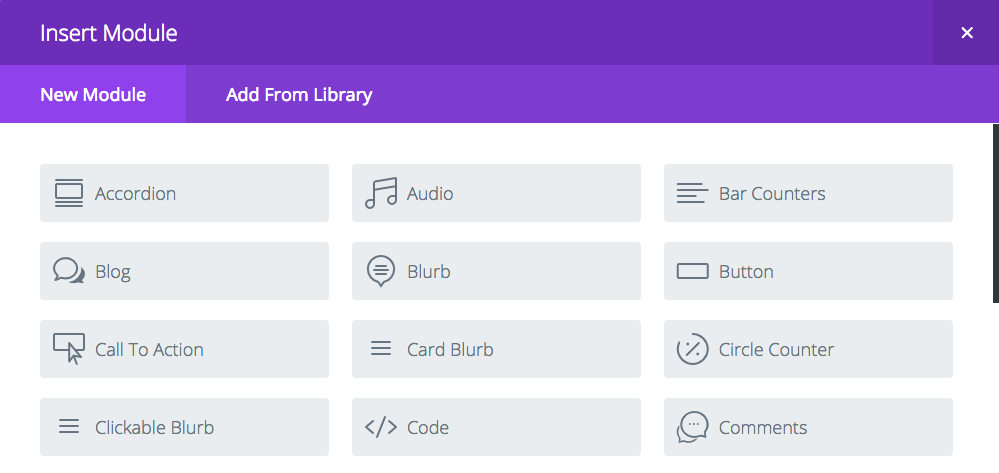
Now, the Card Blurb will be a new module.
Lastly, we need to add our CSS to make things happen.
.ch-info-front2 .et_pb_main_blurb_image {margin-bottom: 0;}
.ch-item2 {width: 100%;	height: 100%;position: relative;cursor: default;-webkit-perspective: 900px;
	-moz-perspective: 900px;
	-o-perspective: 900px;
	-ms-perspective: 900px;
	perspective: 900px;}
.ch-info2{position: absolute;width: 100%;height: 100%;-webkit-transform-style: preserve-3d;
	-moz-transform-style: preserve-3d;
	-o-transform-style: preserve-3d;
	-ms-transform-style: preserve-3d;
	transform-style: preserve-3d;}
/* ------------ Turn to the right 90deg --------------- */
.ch-item2:hover .ch-info-front2 {
    -webkit-transform: translate3d(280px,0,0) rotate3d(0,1,0,90deg);
    -moz-transform: translate3d(280px,0,0) rotate3d(0,1,0,90deg);
    -o-transform: translate3d(280px,0,0) rotate3d(0,1,0,90deg);
    -ms-transform: translate3d(280px,0,0) rotate3d(0,1,0,90deg);
    transform: translate3d(280px,0,0) rotate3d(0,1,0,90deg);
    opacity: 0;
}
.ch-item2:hover .ch-info-back2 {
    -webkit-transform: rotate3d(0,1,0,0deg);
    -moz-transform: rotate3d(0,1,0,0deg);
    -o-transform: rotate3d(0,1,0,0deg);
    -ms-transform: rotate3d(0,1,0,0deg);
    transform: rotate3d(0,1,0,0deg);
    opacity: 1;
}
.ch-info2 .ch-info-back2 {
    -webkit-transform: translate3d(0,0,-280px) rotate3d(0,1,0,-90deg);
    -moz-transform: translate3d(0,0,-280px) rotate3d(0,1,0,-90deg);
    -o-transform: translate3d(0,0,-280px) rotate3d(0,1,0,-90deg);
    -ms-transform: translate3d(0,0,-280px) rotate3d(0,1,0,-90deg);
    transform: translate3d(0,0,-280px) rotate3d(0,1,0,-90deg);
    opacity: 0;
}
.ch-info2>div {display: block;position: absolute;width: 100%;	height: 100%;background-position: center center;-webkit-transition: all 0.4s linear;
	-moz-transition: all 0.4s linear;
	-o-transition: all 0.4s linear;
	-ms-transition: all 0.4s linear;
	transition: all 0.4s linear;
	-webkit-transform-origin: 0% 50%;
	-moz-transform-origin: 0% 50%;
	-o-transform-origin: 0% 50%;
	-ms-transform-origin: 0% 50%;
	transform-origin: 0% 50%;}
.ch-info2 p {color: #00a69a;padding: 10px 5px; font-style: italic;margin:30px;font-size: 18px;border-top: 1px solid rgba(255,255,255,0.5);line-height:1.2em;}
.ch-info2 p a {	display: block;	color:#00a69a;font-style: normal;font-weight: 700;text-transform: uppercase;font-size: 18px;
	letter-spacing: 1px;padding-top: 4px;}
.ch-info2 p a:hover {color:#f38020;}
.ch-grid2 {margin: 20px 0 0 0;padding: 0;list-style: none;display: block;text-align: center;width: 100%;}
.ch-grid2:after,.ch-item2:before {content: '';  display: table;}
.ch-grid2:after {clear: both;}
.ch-grid2 {width: 300px;height:300px;} /* setting the blurbs height and width */
That's it, you should be ready to rock. This effect can be rather tricky. Because of the absolute positioning of several elements, a fixed height is required. In this example, it's 300 X 300. This may or may not work for you. You can change the size in the last line of the css. You can play with the transform values and change the direction that the blurb rotates. It can be both fun and frustrating to figure out. You could also incorporate a different Tymapanus example that have the same structure.